John runs a small courier service with five vans. He handles bookings on paper and spreadsheets, and answers dozens of calls every day about “Where’s my parcel?” When a $500 COD package went missing last month, he lost trust with a key client overnight. This scenario is common: manual systems can’t scale. In fact, in many markets 50–80% of deliveries are cash-on-delivery (COD), making handwritten ledgers and phone calls very risky. So how to manage a courier business online in a way that fits a small operation’s budget and workflow? This guide walks through assessing your needs, choosing courier management software, and tackling real-world issues like COD and staff training, so you avoid those costly manual errors.
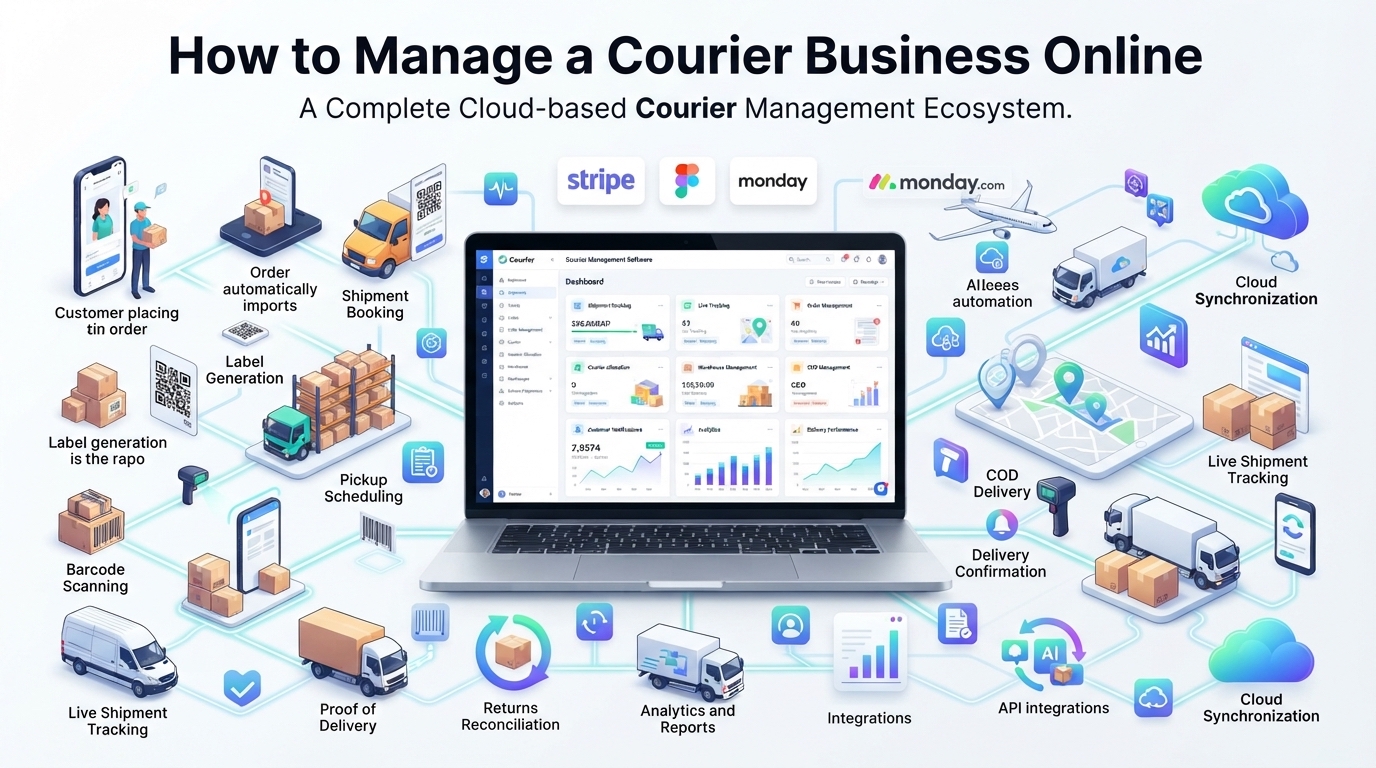
Modern courier software automates tasks that John does by hand. A loaded delivery van is optimized by route optimization software, coordinated with drivers via a mobile app, and tracked end-to-end online. Automated dispatch and tracking reduce wasted miles and customer calls. For example, dynamic route planning can cut travel distance and fuel costs significantly, since it “optimises routes [to] cut kilometres, costs, and carbon”. And built-in GPS tracking means customers see real-time updates instead of having to call. All these features come in modern courier dispatch software or courier tracking software, often delivered as a cloud-based courier software platform.
Evaluate your current operations
Before picking a system, map out your business. How many parcels do you handle in a day or week? What percentage are COD? How many drivers and vehicles do you manage? Ask yourself: what parts of the process currently cause the most pain? Common issues include lost packages, billing errors, late deliveries, or piles of paperwork. A useful rule is that small manual operations might get by up to ~20–30 deliveries/day, but beyond that errors compound fast. Even a 10% efficiency improvement on 500 deliveries/day can translate to big savings in fuel, labor and customer retention. Consider writing down answers to questions like:
- Volume: “We deliver ___ packages per day on average.”
- COD share: “About ___% of our shipments are cash-on-delivery (COD).”
- Peak load: “At busiest times (holidays, sales), we do ___ deliveries/day.”
- Pain points: “We lose ___ per month to missed deliveries or billing mistakes.”
This self-audit helps decide what features matter. For example, if COD is high, you’ll need strong COD reconciliation features (see below). If customer calls for updates are overwhelming, real-time tracking and notifications must be a priority. Understanding your baseline will guide all choices and let you measure success later.
Key features to look for in courier software
Once you know your needs, look for a solution that offers the essential functions of a courier management software or delivery management system. Key features include:
- Order & route management: The system should let you enter or import orders easily (via dashboard, Excel/CSV upload or e-commerce API). It should automatically assign drivers and sequence stops optimally. Modern platforms use delivery route optimization software under the hood, shuffling stops to minimize distance and meet time windows. This can shrink fuel use significantly.
- Real-time tracking: Each shipment is tracked via GPS. Dispatchers (and customers) get live status updates. Real-time parcel tracking software means supervisors see where drivers are, and customers can watch a map instead of calling. Studies show this improves customer trust and cuts support calls significantly.
- Driver mobile app & ePOD: Drivers use a smartphone app (Android or iOS) to view assignments, follow navigation, and capture proof of delivery. The app should record digital signatures or photos (electronic POD) at drop-off. This replaces paper forms with instant, cloud‑available POD. Captured ePODs feed back to office for faster invoicing and cash collection.
- Dispatch automation: Look for features that automate driver allocation. A good system factors in driver location, workload, vehicle capacity and delivery priority when dispatching. For example, it might auto-assign a high-value parcel to the nearest available driver during rush hour. Smarter dispatch saves back-and-forth calls and “run sheet” paperwork.
- COD/payment handling: Because many deliveries in common are COD, the software should track how much cash each driver collects and match it to the orders. Ideal features include real-time COD collection tracking per driver, automated reconciliation against invoiced amounts, and alerts for discrepancies. In short, the software should eliminate most cash-counting errors. (“Studies show manual COD processes result in 2–5% discrepancies”.)
- Multi-carrier integration: If you use various courier services (Blue Dart, DTDC, etc.) or aggregator tools, the platform should integrate with them. That means generating AWBs, labels and tracking all carriers from one dashboard. For franchise or aggregator models, centralizes bookings and billing across dozens of partners so nothing falls through the cracks.
- Customer interface: Many solutions provide a web portal or mobile app where customers (shippers or end-recipients) can create orders, view tracking, and get invoices. This self-service cuts calls. For example, a customer portal can let your regular business clients upload bulk orders and see delivery analytics instantly.
- Reporting & analytics: Look for built-in reports on deliveries, costs, driver performance and more. Dashboards that show on-time rates, route efficiency or COD collection summaries help you spot problems and improve the business over time.
These features are common in top courier dispatch solutions. In short, you want a courier tracking software package that replaces Excel and printed consignment notes with digital workflows – everything from booking to delivery confirmation in one system.
Integration and local workflows
First, ensure COD is first-class: the software should handle COD billing and settlements, bank transfer cycles. It should generate reports showing what each driver owes and alert you to any shortfall.
Second, think about carriers and geographies PIN code areas can be tricky – coverage varies by courier. A good system allows connecting to multiple courier networks or aggregators so you can choose the best partner per route. It may also integrate with major e-commerce platforms (Shopify, Amazon, etc.) or marketplaces for auto-booking. If you ship internationally, check for integration with popular forwarders too.
Third, payment and billing. If you offer pre-paid pickups (customer pays by card), or collect COD, the system should reconcile payments and generate invoices. For COD-heavy businesses, look for features like driver “wallets” (tracking outstanding COD balances) and auto-invoicing once settlements clear. This prevents the common manual headache of tracking dozens of cash collections on paper.
Finally, consider communication channels: In Asia, WhatsApp is ubiquitous. Leading courier platforms integrate WhatsApp for status updates and even order booking by chat. If your customers expect WhatsApp notifications or call-center integration, this could be a big plus.
Staff training and change management
Even the best software is useless if the team doesn’t adopt it. Owners often worry, “My drivers won’t use an app” or “It takes time to train staff”. These challenges are real but manageable. Start by involving your team early: explain how digital POD and routing will make their lives easier (no more lost slips or unclear directions). Choose a system with a simple, local-language app interface. Provide hands-on training – even a 1-hour workshop per driver can do wonders.
If possible, pilot the software on a small scale first. For example, use it for just one vehicle or a single delivery route. This lets you find bugs and teach users without halting the whole business. Use this pilot to gather feedback: if drivers complain the app is slow, that’s fixable (better phones or network). Gradually expand as everyone gets comfortable. In our experience, once drivers see the app reduce paperwork and mistakes, many embrace it eagerly.
Encourage the team by highlighting wins: “Last week we caught a potential theft because the app logged a failed delivery, so we recovered the parcel.” Or “Our billing errors dropped to zero this month.” Practical benefits help overcome habits. Also train any dispatchers and accounting staff on the system (e.g. linking with your accounting software like Tally or QuickBooks, if supported). The goal is to integrate the new software into your daily routine until it’s as second-nature as picking up a phone.
Cost, pricing and deployment
Cost is a top concern. Yes, courier software has prices – but consider it an investment against losses from manual errors. There are generally two deployment models:
- Cloud/SaaS: You pay a monthly or yearly fee (often per user or per delivery), and the vendor hosts everything. Upfront setup is low. You get automatic updates and don’t need an IT server. For most small-to-medium firms, this is ideal. For example, some vendors offer entry-level plans around ₹1,000–3,000 per month (roughly $12–39 USD), depending on volume and features. One analysis even notes small businesses (50–500 deliveries/day) can find plans like “€299 setup + €12/mo” (roughly ₹9,000 + ₹1,000/mo) to get started.
- On-premise (self-hosted): You pay a license fee (often a one-time purchase) to run software on your own server. This avoids recurring fees but requires IT infrastructure and maintenance. On-premise may make sense if you do very high volume, have IT staff, or want full data control. However, most modern solutions offer cloud with negligible difference in reliability.
Don’t forget hidden costs: initial setup fees, hardware (tablets/scanners), integration work, and training hours. Also check if the pricing is per-delivery or per-user, as these can add up. Ask about support: will the vendor coach you through launch?
Overall, cloud based courier software tends to have lower upfront cost and faster ROI. One pricing guide notes SaaS systems often have “no setup fee” and monthly plans as low as a few dollars per month per user. Regardless, always do a quick total-cost estimate: “What’s the annual software spend vs. what we currently lose on errors/delays?” Even a one-week reduction in delivery time or a couple of misplaced parcels a month can justify the expense.
Implementation tips
When you’re ready to switch, proceed methodically. Here are some practical tips:
- Choose a trial wisely. Take advantage of free trials or demos. Don’t just demo with hypothetical data – test with your real orders. Run 50–100 sample shipments through the system to see how it handles your labels, routes, and billing.
- Start small. Don’t convert all routes at once. Begin with your simplest route or a few drivers. Use the software alongside your old system initially, to cross-check results and build confidence.
- Train gradually. Hold brief training sessions for dispatchers and drivers. Create quick reference guides (e.g. “How to sign a delivery” or “How to mark a pickup”) in your local language if possible. Encourage questions; it’s normal to troubleshoot a few issues early on.
- Monitor KPIs from day one. Track metrics like on-time delivery rate, delivery cost per km, number of delivery attempts, and customer call volume. Compare these to your old baseline after a month. Often you’ll see improvements fast (e.g. fewer missed routes due to better scheduling). Remember, even a 10–20% boost in efficiency can equate to a meaningful drop in costs.
- Keep customers informed. Announce the change to your clients: “We now offer online tracking and instant e-receipts.” This can actually boost customer satisfaction (and differentiate you from competitors who still rely on phone-only updates).
For example, one small courier we know rolled out their software on just two vehicles first. Within a week they saw 15% more deliveries per van, simply because the app’s routing allowed an extra stop each day. They also cut customer support calls by nearly half, as buyers could see GPS updates themselves. Use these wins as proof of concept for the rest of the team.
Final takeaway
Managing a courier business online isn’t magic – it’s about systematic automation of steps you already do. The goal is to eliminate errors, paperwork and delays. By carefully evaluating needs and choosing software that fits your scale, you’ll unlock benefits like faster deliveries, happier customers and better cash control. Start by listing your top pain points (e.g. “missing CODs” or “drivers’ idle time”) and see which system features solve them. Even if cost seems high, remember that lost COD and driver downtime cost you money every day.
In short, embrace software as an investment. It won’t solve everything overnight, but with a thoughtful rollout you’ll quickly notice fewer lost packages and clearer finances. As one courier operator put it, “Once my small team started using the app, we never went back. We even found time to sign on one more e-commerce client.” So take the leap: try a trial, involve your team, and measure the gains. The result will be a leaner, more professional courier operation – one that runs online so your business can grow offline.
Sources: We drew on industry guides and provider data to highlight best practices. Always verify any cost or performance claims with vendors or peers before buying software.